
Categories
Application Interactive HPC Supercomputing Tutorial Webinars & Tutorials - video Workshop

Webinar recording: Learn to record and transcribe securely with the Dictaphone app

In this webinar recording, you will watch a hands-on workshop introducing Dictaphone – a UCloud application that enables researchers to securely record and transcribe interviews directly from their own devices, even when working with sensitive data. 

In the recording, we guide you through how to: 

  • Record interviews and conversations using Dictaphone on your laptop or smartphone 
    Audio is streamed in real time to the secure UCloud backend, ensuring that no data is stored locally on your device – making Dictaphone well suited for handling sensitive data. 
  • Automatically transcribe recordings within the same workflow
    Dictaphone includes built-in transcription functionality, allowing you to convert speech to text quickly and efficiently. 
  • Make the most of Dictaphone, including tips, additional features, and real research use cases. 

This recording is relevant for researchers across all departments as well as students. 

Dictaphone is a beginner-friendly application and does not require any technical background. 

Time stamps 

  • 00:00 – 06:25: Introduction and getting started 
    Requirements, data classifications, and the basic workflow. 
  • 06:25 – 32:15: Live demonstration of Dictaphone 
    How to record and transcribe, and how to navigate the platform before and after recording. 
  • 32:15 – 33:50: Data storage and security 
    How Dictaphone stores data and why it is suitable for sensitive data. 
  • 33:50 – 35:30: Related resources and support 
    Other webinars, related UCloud apps, and contact information. 
  • 35:30 – 43:15: Q&A session 
    Questions from the participants. 
  • 43:15 – 44:22: Wrap-up and next steps 
    Summary and where to find further resources. 

Categories
Interactive HPC Supercomputing UCloud

University Collaboration Strengthens National Research Infrastructure with New Green Data Center 

The shared infrastructure of three Danish universities has become a significant success for research and innovation. Now, capacity is strengthened further with the establishment of a new, more energy-efficient and sustainable data center.

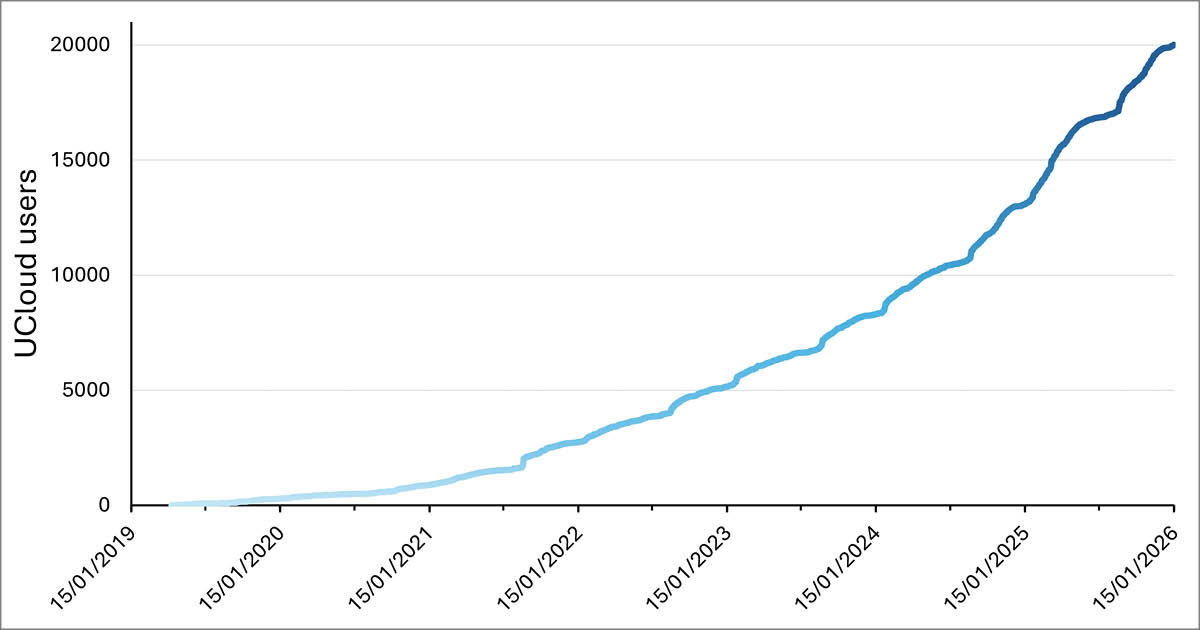
Over the past six years, demand for the type of interactive, user-friendly supercomputing provided by DeiC Interactive HPC has proven enormous. UCloud, the platform behind the service, now has nearly 20,000 users, including both students and researchers—a truly unique figurefor a supercomputer. Comparable – and even larger – supercomputers in Europe cannot boast even half as many users or the same broad representation across gender and research fields as UCloud.

“DeiC Interactive HPC and UCloud have, in six years, changed the way Danish researchers work with supercomputing. With UCloud, we have made advanced computing power accessible across disciplines—from students to experienced researchers—and created a platform that combines user-friendliness with high performance. It’s a success we are proud of and one that shows Denmark can lead the way in digital research,” says Marianne Holmer, Dean of the Faculty of Science, University of Southern Denmark. 

The New DeiC Interactive HPC – More Computing Power and Sustainability 

DeiC funding has been increased, and new opportunities for collaboration have emerged for the consortium behind the service, consisting of the University of Southern Denmark (SDU), Aarhus University (AU), and Aalborg University (AAU). SDU, Danfoss, and Hewlett Packard Enterprise (HPE) have entered into a collaboration to establish a new data center (link), where DeiC Interactive HPC’s hardware will be placed going forward. The new data center makes it possible to combine high-performance computing with energy-efficient and innovative cooling and heat recovery. At the same time, Danfoss’ cooling and heat recovery systems enable surplus heat from the new data center to be reused. 

The initiative is supported by ProjectZero, a public-private partnership in Sønderborg with the goal of making its energy system carbon-neutral by 2029. The project focuses on a three-step decarbonization approach of reducing, reusing, and renewing energy and has already achieved a significant reduction in energy-related carbon emissions.

The increased investment from DeiC means the consortium can deliver higher capacity to its many users. SDU, as the consortium representative, has worked with the supplier HPE to assemble a supercomputer that includes the latest and most powerful GPU hardware – essential for AI research and handling large datasets. All of this will be available in UCloud’s secure, user-friendly open-source environment.

With the new data center, we are taking a decisive step into the future of research infrastructure. We are showing that Denmark can deliver world-class supercomputing – not only in performance but also in sustainability and digital sovereignty,” says Professor Claudio Pica, Director of the SDU eScience Center. 

A Unique Contribution to Denmark’s Digital Sovereignty 

DeiC Interactive HPC is located on Danish soil and uses Danish-developed open-source cloud technology – UCloud. This allows Danish researchers to efficiently utilize supercomputer resources without relying on foreign technology providers, and in an environment suitable even for sensitive personal data.

There is currently much discussion about digital sovereignty and the challenges posed by the fact that parts of the digital infrastructure that Denmark heavily depends on is developed, owned, and controlled by foreign tech giants. Here, UCloud and the Interactive HPC collaboration are a unique example of how public institutions can develop and use secure, transparent, and sustainable digital solutions that support research, education, and society’s broader digital needs,” says Professor Kristoffer Nielbo, Head of the Center for Humanities Computing, Aarhus University. 

The consortium’s role in strengthening Denmark’s digital sovereignty was recently highlighted by a visit from the Minister for Digital Affairs, Caroline Stage Olsen. With increased capacity and a new data center, it is clear that the consortium can contribute even more to this agenda in the future. 

University Collaboration Beyond Hardware

In the new consortium setup, SDU is responsible for operating and delivering the hardware for DeiC Interactive HPC, while all three universities contribute to developing the service, maintaining and adding new apps to UCloud’s App Store, and supporting the other universities. One of the keys to DeiC Interactive HPC’s success is not just offering supercomputing power – but also the support and user-friendliness that make these powerful resources accessible to a wide range of researchers, including students.

The strength of the consortium lies in the fact that we don’t just deliver hardware, we create a shared platform where universities develop solutions together. This provides a dynamic service that is continuously adapted to researchers’ needs. By combining computing power with user-friendly tools and solid support, we open the door to new opportunities in research and innovation,” says Jacob-Steen Madsen, Deputy Director, IT Services, Aalborg University. 

Categories
Application Supercomputing UCloud

New on UCloud: Dictaphone – record and transcribe securely 

Dictaphone is a new app on UCloud that allows researchers to record and transcribe interviews and conversations directly from their own devices. 

With Dictaphone, recordings are streamed in real time to the secure UCloud backend, ensuring that no data is stored locally on your device. This makes it ideal for research projects involving sensitive data. 

“The Dictaphone application makes it possible for researchers to create recordings using their own laptop or smartphone and stream data directly to UCloud. This ensures data security, while the built-in transcription features enable creative use cases that support the entire interview process”, says Nikolaj Andersen, DevOps Engineer at Aalborg University and the developer behind the new app. 

Key features 
  • Record directly from your device
    Use Dictaphone to capture interviews and conversations straight from your laptop or smartphone. The user interface is simple to use and optimized for viewing on both small and large screens. 
  • Speaker recognition
    The app can distinguish between multiple speakers in the same recording, making transcripts easier to read and analyze for interviews or group discussions. 
  • No local storage – full data security
    All recordings are streamed live to the secure UCloud backend. Nothing is saved on your device, which means you can safely handle sensitive data without worrying about your data being stored in an unsafe location. 
  • Built-in transcription
    Dictaphone includes built-in transcription functionality, enabling you to easily convert speech to text and streamline your interview process. 
Who is it for? 

Dictaphone is designed for anyone who records audio as part of their research – regardless of discipline. It is ideal for both one-on-one interviews and group discussions, thanks to its speaker recognition feature. 

The simple user interface makes it easy to use, even without technical experience. 

Flexible workflows 

Whether you prefer to transcribe right after each question or wait until the full interview is done, Dictaphone supports both workflows. You can even start transcription automatically right after your recording ends, so your transcript is ready by the time you get back to your desk. 

You can also switch languages, making Dictaphone useful for both Danish and international research projects. 

Learn more 

Guides and technical details:
Dictaphone Guide
Dictaphone documentation on UCloud

You can also get a hands-on introduction to Dictaphone at our free webinar on 26 November 2025. Sign up here.

Categories
Interactive HPC Research Supercomputing

UCloud and Digital Sovereignty in focus during Ministerial Visit

On 27 October, Minister for Digital Affairs Caroline Stage Olsen visited the University of Southern Denmark (SDU) to learn more about UCloud and the Interactive HPC Consortium. 

The visit aimed to showcase how Danish research contributes to strengthening Denmark’s digital independence and sovereignty. The Department of Mathematics and Computer Science (IMADA) and the SDU eScience Center at the Faculty of Science were pleased to welcome the Minister to SDU.

During her visit, the Minister was introduced to UCloud, an open-source cloud platform operated by the Interactive HPC Consortium. Originally developed by SDU, UCloud has been available since 2019 via the DeiC Interactive HPC service to all researchers in Denmark. Today, the consortium behind UCloud comprises SDU, AU, and AAU, who jointly develop and operate the platform.

The Minister emphasised that digital sovereignty and the development of cloud solutions under Danish control are key priorities for the government:

”This is something we are increasingly discussing – how we can become more independent and strengthen our control over digital infrastructure. That is part of what I am learning about today,” said Caroline Stage Olsen, Minister for Digital Affairs, during her visit.

Building Bridges Between Research and Society

UCloud serves as Denmark’s national platform for interactive high-performance computing (HPC) and is Europe’s most widely used research supercomputing platform. With more than 18,000 users across universities, public authorities, and private companies, it stands as a clear example of how Danish-developed solutions can promote digital self-reliance.

“True digital sovereignty requires public infrastructure you can inspect, control, and improve. UCloud turns sovereignty from a slogan into a living, open-source public good — Europe’s largest research cloud built in Denmark. Investing in open infrastructure like UCloud is how we can secure our digital future,” said Professor Claudio Pica, Head of the SDU eScience Center.

A Responsibility Towards Society

The visit also prompted a broader dialogue about the responsibility of research institutions in an era where digitalisation permeates every aspect of society – from healthcare and education to the energy sector and public services.

The visit concluded with a tour of SDU’s supercomputing facilities, where the Minister was introduced to the advanced infrastructure that supports Interactive HPC – UCloud.

This article is based on an original story published on SDU’s website.

Categories
Interactive HPC Supercomputing

Working together on the future of UCloud 

Recently, representatives from Center for Humanities Computing at Aarhus University, eScience Center at University of Southern Denmark and CLAADIA at Aalborg University gathered for a two-day workshop filled with collaboration, knowledge sharing, and new ideas for the UCloud platform. 

The workshop brought together the consortium’s technical experts, user support teams, and outreach coordinators to discuss the next steps for UCloud. The goal was to align strategies, evaluate recent developments, and ensure that UCloud continues to evolve in line with the needs of the Danish research community. 

Collaboration across universities 

UCloud is developed and operated in close collaboration between the three universities, and workshops like this play a key role in maintaining strong coordination across the consortium. Since the teams are based at different locations, meeting in person provides an important space to strengthen relations, align efforts, and identify shared priorities for the platform’s future. 

Plenary sessions, presentations, and parallel workshops 

The two days included a mix of plenary sessions, presentations, and parallel workshops across different working groups. Topics ranged from user support, training, and outreach to technical development and new feature implementation. Updates were also shared on UCloud’s fast-growing user base. 

Insights from users 

A highlight of the workshop was hearing directly from the users. Researchers Postdoc Kenneth Enevoldsen and Postdoc Simon Aagaard Enni joined us to share their research projects, Lex.llm and Danish Foundation Models. They shared how UCloud supports their research today, while also pointing to areas where the platform can evolve further to better support their work. 

Kenneth, who is an experienced UCloud user, emphasized how future inference support on UCloud could help both him and many other researchers in practice. In this context, he specifically referred to the need for running pre-trained large language models (LLMs) directly on the platform. 

“UCloud support for inference would be incredibly liberating for research. It would either allow us to avoid spending credits on commercial API providers or significantly reduce the time required to set up LLMs for exploring small research questions. A broad inference API would enable more open experimentation with models, enhancing both the scope and impact of research projects.” 

Looking ahead 

As the workshop concluded, the participants outlined key priorities and future directions for the platform. The discussions and decisions made will guide upcoming development efforts and ensure that UCloud remains a flexible, secure, and user-friendly environment for researchers across disciplines. 

We will also continue to focus on preparing users to work confidently with UCloud through hands-on training sessions held as webinars. During the workshop, we finalised the plans for this semester’s webinar offerings, which will take place on the following dates: 

Categories
Application Interactive HPC Supercomputing Workshop

Workshop 4/12: Building Intelligent Knowledge Assistants with RAGFlow on UCloud

Date: 4 December 2025
Time: 13:00 – 14:00 (CET)
Location: Online, via Zoom

Join us for a hands-on webinar introducing RAGFlow, an advanced Retrieval-Augmented Generation (RAG) platform available on UCloud. RAGFlow enables you to build your own intelligent assistants by combining document retrieval, embeddings, and large language models – all within a user-friendly visual interface.

In this session, you will learn how to: 

  • Launch RAGFlow on UCloud – explore the application options in the job page and understand how to configure your workspace.
  • Navigate the RAGFlow interface – get familiar with the main dashboard, menus, and workflow structure.
  • Set up an embedding and chat model – choose from available models and understand their roles in retrieval and dialogue generation.
  • Create and manage knowledge bases – upload and process your own datasets, configure chunking and embedding strategies, and test retrieval quality.
  • Build a chat assistant – connect your models and knowledge base to create an interactive, context-aware chatbot.
  • Design a basic agentic workflow – combine tools and steps in RAGFlow’s visual builder to automate reasoning and responses.
  • Launch RAGFlow on UCloud – explore the application options in the job page and understand how to configure your workspace.

All workflows will be demonstrated live on UCloud, showing how to go from data ingestion to an operational AI assistant – no coding required.

Target audience: Researchers, students, and AI-curious users interested in document-based question answering, knowledge management, and conversational AI.

Technical Level: Beginner to Intermediate — no prior experience with RAG or model configuration needed. Basic familiarity with UCloud will be helpful. If you’re new to the platform, we recommend signing up for the Getting Started with UCloud workshop on 19 November

Sign up for the RAGFlow on UCloud workshop

About the RAGFlow application:

RAGFlow is a new application being introduced on UCloud this December. It lets you build your own smart assistant using your documents. It combines search and AI to answer questions based on information you provide – no coding required.

Key features: 

  • Create your own knowledge base
    Upload PDFs, text files, or notes and let RAGFlow organize them for easy retrieval.
  • Choose AI models
    Pick an embedding model for search and a chat model for conversations, all within the app. You can also add other model types – such as reranking for better answer accuracy, speech-to-text for audio input, image-to-text for scanned documents, or text-to-speech for spoken responses.
  • Chat with your data
    Ask questions and get context-aware answers directly from your uploaded materials.
  • Simple visual workflow
    Set up each step through an easy, guided interface.
  • Secure on UCloud
    All data stays private and runs safely within UCloud’s secure environment.

RAGFlow is perfect for beginners who want to explore how AI can search, summarize, and explain their own research data or learning materials. For advanced users, RAGFlow also offers powerful customization through agentic workflows, where multiple models and tools can work together in sequence.

Keep an eye on updates here or in the UCloud app catalogue to be the first to know when RAGFlow becomes available.

Categories
Interactive HPC

Join us on LinkedIn

We’re excited to share that you can now follow Interactive HPC on LinkedIn 

Our new page will keep you updated with the latest news from our world of high-performance computing – including use cases, upcoming events, webinars, and applications on UCloud. 

Follow us to stay informed about: 

  • New applications and tools  
  • Use cases showcasing how researchers from all research areas apply HPC in their work 
  • Events and webinars, where we share knowledge and best practices with UCloud users 

Join us on LinkedIn

Categories
Application Tutorial UCloud Workshop

Workshop 19/11: Getting Started with UCloud – Introduction to Features and New Tools

Date: 19 November 2025
Time: 13:00 – 14:30 (CET)
Location: Online, via Zoom

Join us for a hands-on workshop where we guide you through the main features and new tools on UCloud, the national research computing platform that brings together data storage, computation, and collaboration in one place.

In this session, you will learn how to: 

  • Navigate the UCloud interface – understand the menus, and dashboard to access your projects and resources efficiently.
  • Manage files and drives – create and organise project drives, upload and share data, and use the new integrated file editor, terminal and search.
  • Work with projects – set up collaborative projects, manage members and permissions, and monitor resource allocations.
  • Run applications on UCloud – explore the application catalogue, launch and monitor jobs, and use application documentation.
  • Use the latest UCloud features – discover new tools such as the Command Palette for quick actions, integrated Terminal for lightweight file management, real-time job metrics and improved Usage and Allocations pages.

Target audience: Staff, researchers, students, and new UCloud users across all disciplines who want to understand how to get started with UCloud and make the most of its latest features.

Technical Level: Beginner to Intermediate — no prior experience with UCloud required.

Sign up for the Getting Started with UCloud workshop

Categories
Application Workshop

Workshop 26/11: Recording and Transcribing with the Dictaphone application

Date: 26 November 2025
Time: 12:30 – 13:30 (CET)
Location: Online, via Zoom

Join us for a hands-on workshop where we introduce Dictaphone – a new UCloud application that allows researchers to securely record and transcribe interviews directly from their own devices. 

In this session, you will learn how to: 

  • Use Dictaphone to record interviews and conversations directly from your laptop or smartphone. The recordings in Dictaphone are streamed in real time to the secure UCloud back end – ensuring that no data is stored locally on your device, making the app ideal for working with sensitive data.
  • Transcribe recordings automatically within the same workflow. Dictaphone has built-in transcription functionality, enabling you to easily convert speech to text and streamline your interview process.
  • How to make the most of Dictaphone — with tips, extra features, and real research use cases.

Target audience: Researchers across all departments, students, those interested in AI. 

Technical Level: Basic to Intermediate – beginner-friendly and requires no technical background. Basic familiarity with UCloud will be helpful. If you’re new to the platform, we recommend signing up for the Getting Started with UCloud workshop on 19 November

Sign up for the Dictaphone workshop

About the Dictaphone application:

Dictaphone is a new application being introduced on UCloud this November. It allows researchers to securely record and transcribe interviews and conversations directly from their own devices – making the interview process easier and more time-efficient.

Key features: 

  • Record directly from your device
    Use Dictaphone to capture interviews and conversations straight from your laptop or smartphone. The user interface is simple to use and optimised for viewing on both small and large screens.
  • No local storage – full data security
    All recordings are streamed live to the secure UCloud backend. Nothing is saved on your device, which means you can safely handle sensitive data without worrying about your data being stored in an unsafe location.
  • Built-in transcription
    Dictaphone includes built-in transcription functionality, enabling you to easily convert speech to text and streamline your interview process.
  • Speaker recognition
    The app can distinguish between multiple speakers in the same recording, making transcripts easier to read and analyse for interviews or group discussions. 

The Dictaphone app is designed for researchers across all disciplines who record audio as part of their work. It supports different workflows – whether you prefer to transcribe after each question in your research process or after the full interview, you can use Dictaphone. You can also switch languages, making it ideal for both Danish and international projects. 

Keep an eye on updates here or in the UCloud app catalogue to be the first to know when Dictaphone becomes available.

Categories
Application Supercomputing

Introducing ROS2 on UCloud

Powering the Future of Robotics Research

A new powerful application for robotics researchers and developers has launched on UCloud: ROS2 (Robot Operating System 2). This open-source middleware and development toolkit offers a flexible and modular framework designed to simplify the development of complex robot software. The app provides a standardised set of tools, libraries, and conventions that streamline the process of building robust and scalable robotic applications.

“By combining the flexibility of ROS2 with the scalability and accessibility of UCloud, we’re enabling researchers to prototype, test, and deploy robotic systems more efficiently than ever before,” says Dr. Federica Lo Verso, computational scientists at the SDU eScience Center’s research support team. Federica has been the responsible developer for implementing the ROS2 app on UCloud. 

Key features of ROS2 include: 

  • Standardised Framework: Reduces development time and cost by offering common tools and libraries.
  • Modular Design: Easy integration of sensors, algorithms, and new technologies.
  • Robust Communication: Enables seamless communication between software components.
  • Developer Tools: Such as simulators and libraries for different tasks ranging from sensor drivers to advanced algorithms for navigation and mapping.
  • Advanced Capabilities: Supports multi-robot systems, real-time applications, production environment and operation in challenging network environments.

Why Use ROS2 on UCloud?

Running ROS2 on UCloud brings several advantages, especially for researchers in engineering, AI and robotics:

  • Access to Scalable Computing Resources: Run simulations and process data using UCloud’s powerful infrastructure.
  • Secure Environment: Work within a trusted and protected platform, ideal for research and collaboration.
  • Pre-installed Distributions: The ROS2 app includes three major distributions – Humble, Jazzy, and Kilted – so you can choose the version that best fits your project needs.
  • Integrated Visualisation Tools: Both RViz2 and Gazebo are included, enabling real-time visualization and simulation of robotic systems.

Whether you’re developing autonomous drones, robotic arms, or mobile robots, the ROS2 app on UCloud provides the tools and computing power you need to bring your ideas to life. Get started today on UCloud and explore the future of robotics with ROS2.